Inspect session logs, tool calls, and token usage for Claude Code through a visual desktop interface.
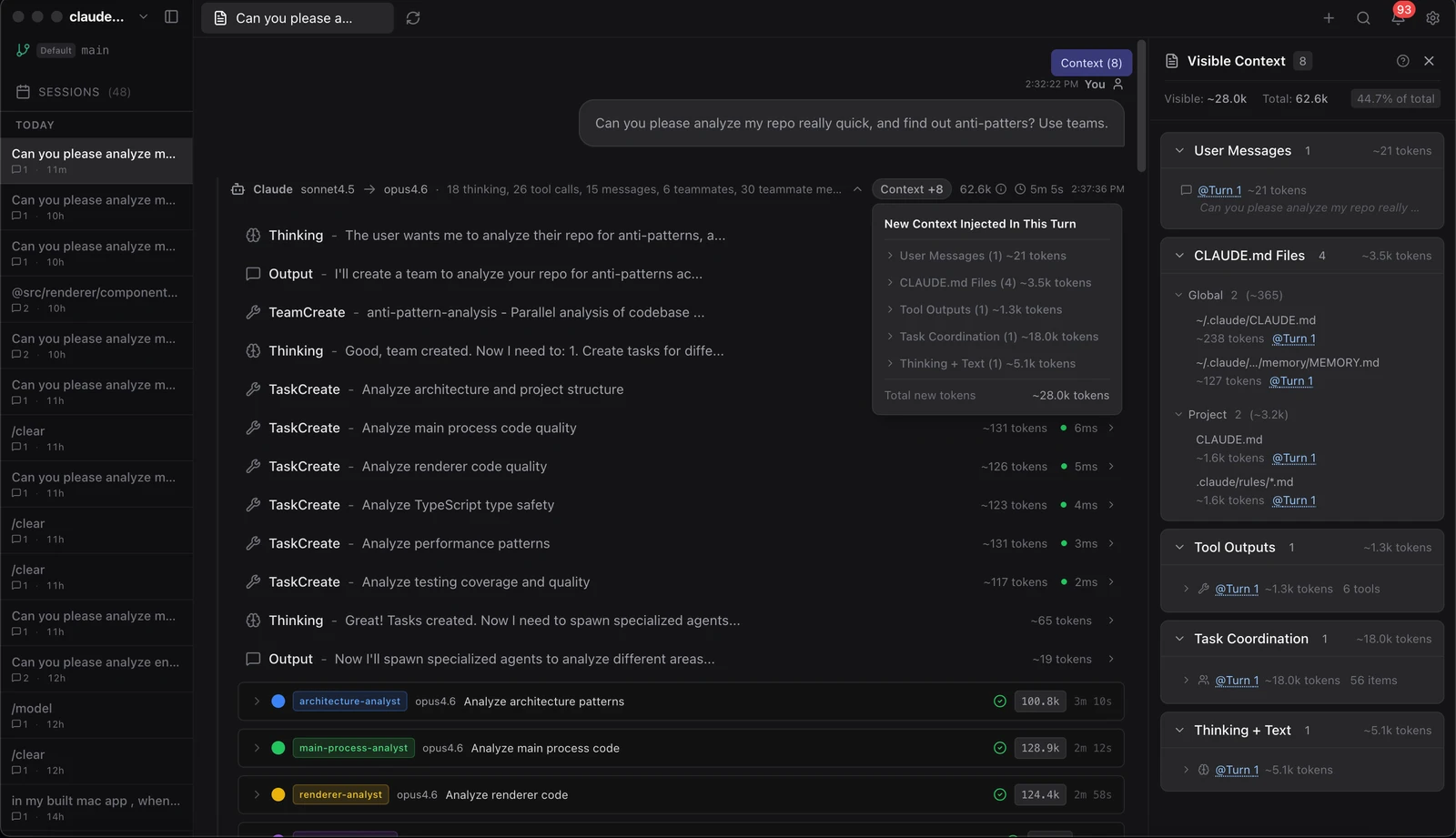
claude-devtools is an open-source debugging tool for Claude Code that provides a visual interface for inspecting session logs. It serves as a companion application to the Claude Code CLI, allowing developers to view detailed activity that is often collapsed or hidden in the terminal output. The software is available as a desktop application for macOS, Windows, and Linux, and can also be deployed via Docker for server-side use.
The application reads session transcripts and logs stored locally in the ~/.claude directory on the user's machine. It reconstructs the interaction history to show exact file paths, full tool call inputs and outputs, and the internal reasoning steps of the AI. This provides a structured alternative to using verbose terminal flags that produce raw JSON dumps, making it easier to audit what the agent actually did during a coding session.
Key features
- Per-turn token attribution across seven categories including thinking and tool I/O
- Visual execution trees for subagents with associated cost and duration metrics
- Specialized viewers for tool calls with syntax highlighting and inline diffs
- Rendering of project memory files with Obsidian-style wikilinks
- Compaction visualization to track how the context window fills and compresses
- SSH remote session support for inspecting logs on remote machines
- One-click copy for code blocks and full-session export to Markdown or JSON
- System notifications for tool errors and high token usage
Built with Electron and TypeScript, the tool operates as a read-only viewer. It does not wrap or modify the Claude Code binary, meaning it requires no API keys and does not interfere with the AI's operation. It is designed for developers who need deep observability into how an AI agent is interacting with their codebase, specifically for auditing changes, tracking token consumption, and debugging failed tool calls. The interface includes a command palette for cross-session search and a multi-pane layout for side-by-side session comparison.
This tool positions itself as a dedicated observability layer for AI-assisted coding workflows.
Similar Open Source Software


Join our newsletter to get shiny new open source software delivered to your inbox. Unsubscribe anytime.