
Control the backlight brightness of multiple external monitors via the Windows system tray using DDC/CI.
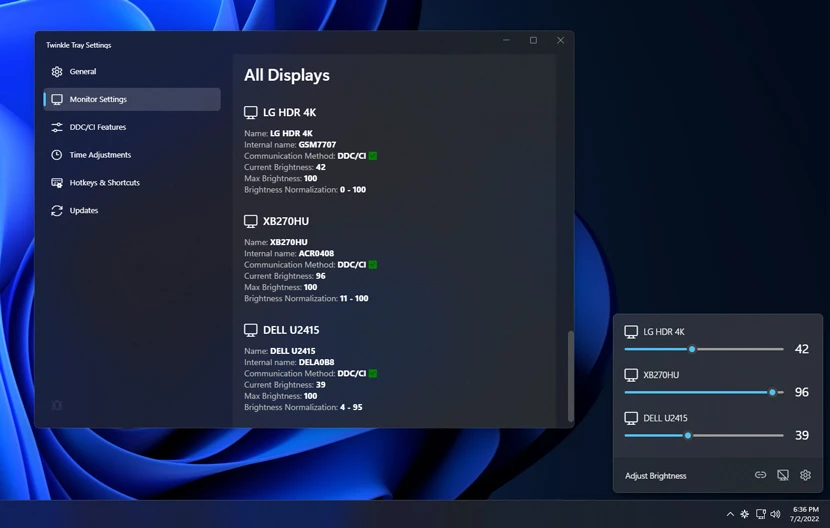
Twinkle Tray is an open-source alternative to proprietary monitor control utilities that enables brightness adjustment for external displays on Windows 10 and 11. It addresses the lack of native Windows support for managing the backlight of external monitors and the inability to control multiple displays from a single interface. This utility allows users to bypass the physical buttons on their hardware to manage lighting directly from the operating system.
The application installs as a desktop tool that resides in the system tray. Users access brightness sliders via a flyout menu, similar to the native Windows volume control. It is available for installation via a standard executable, the Windows Package Manager, Chocolatey, or Scoop. Once installed, the software runs in the background and provides immediate access to display settings through a simple click of the tray icon.
Key features
- Brightness sliders in the system tray for all compatible displays
- Automatic brightness changes based on time of day or idle status
- Hotkey bindings to adjust specific or all monitors
- Backlight normalization across different displays
- Control of DDC/CI features including contrast
- Automatic theme matching for Windows 10 and 11 taskbars
- Command line interface for requesting brightness changes
- Automatic startup with the Windows operating system
Built with Electron, Node.js, and React, the software communicates with hardware using DDC/CI and WMI. It is designed for users with multi-monitor setups who require a centralized way to manage display settings. The tool includes a comprehensive command line interface that allows for brightness offsets, specific VCP code transmission, and monitor listing via arguments. This architecture enables integration with other automation scripts or system shortcuts. Users must ensure that DDC/CI is enabled in their monitor settings for the software to function, as some manufacturers disable this by default.
Twinkle Tray serves as a utility for Windows users to synchronize and automate the lighting of external hardware across various brands and models.
Similar Open Source Software

PowerToys
A collection of system utilities for customizing Windows and streamlining common desktop productivity tasks.

Homepage
A customizable application dashboard with Docker and service API integrations for managing self-hosted environments.

Join our newsletter to get shiny new open source software delivered to your inbox. Unsubscribe anytime.